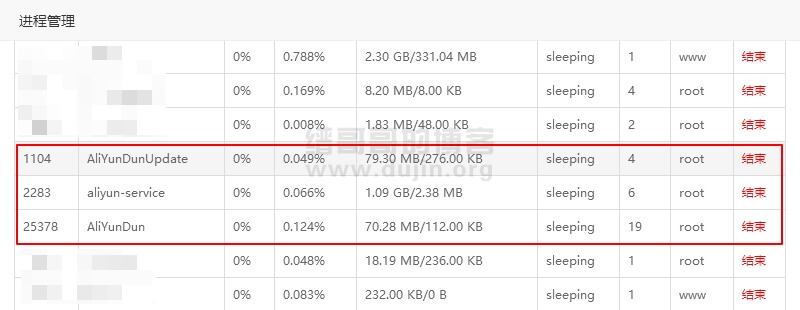
从服务器进程管理中查看可知,阿里云服务器后台都会运行 AliYunDun、aliyun-service、AliYunDunUpdate 这三个进程。而我们有些服务器可能不需要用上这个安全功能,因为重要功能都收费了,所以留着也是占资源:
木马查杀:这个功能也没有用,都种木马了,查也白查(估计以后会收费,或者拆分成高级功能收费)
暴力破解拦截:这个功能没有用,密码复杂点,用不用云盾都破解不了
异地登录提醒:这个功能没有用,都登陆了,还用你提示?
除了这三个根本没有其他免费功能了,所以我们要把他彻底卸载。
卸载阿里云盾/安骑士
1 2 3 4 5 6 | wget http://update.aegis.aliyun.com/download/uninstall.sh chmod +x uninstall.sh ./uninstall.sh wget http://update.aegis.aliyun.com/download/quartz_uninstall.sh chmod +x quartz_uninstall.sh ./quartz_uninstall.sh |
删除残留
1 2 3 | pkill aliyun-service rm -fr /etc/init.d/agentwatch /usr/sbin/aliyun-service rm -rf /usr/local/aegis* |
腾讯云解决方案 ,据说腾讯云也有类似问题:转
1 2 3 4 5 6 7 8 9 10 11 12 13 14 15 16 17 18 | #!/bin/bash #fuck tx process rm -rf /usr/local/sa rm -rf /usr/local/agenttools rm -rf /usr/local/qcloud process=(sap100 secu-tcs-agent sgagent64 barad_agent agent agentPlugInD pvdriver ) for i in ${process[@]} do for A in $(ps aux | grep $i | grep -v grep | awk '{print $2}') do kill -9 $A done done chkconfig --level 35 postfix off service postfix stop echo ''>/var/spool/cron/root echo '#!/bin/bash' >/etc/rc.local |
删除阿里云登录界面欢迎信息
查了一下 sudo nano /etc/motd 就可以编辑/删除倒数第二行的 Welcome to Alibaba Cloud Elastic Compute Service ! 欢迎信息了。
参考链接
https://blog.whe.me/post/uninstall-aliyun-monitoring.html
https://www.cmsky.com/uninstall-aliyun-monitoring